 Fiza3D
How to Make a Game Map: From Blank Grid to 3D Level
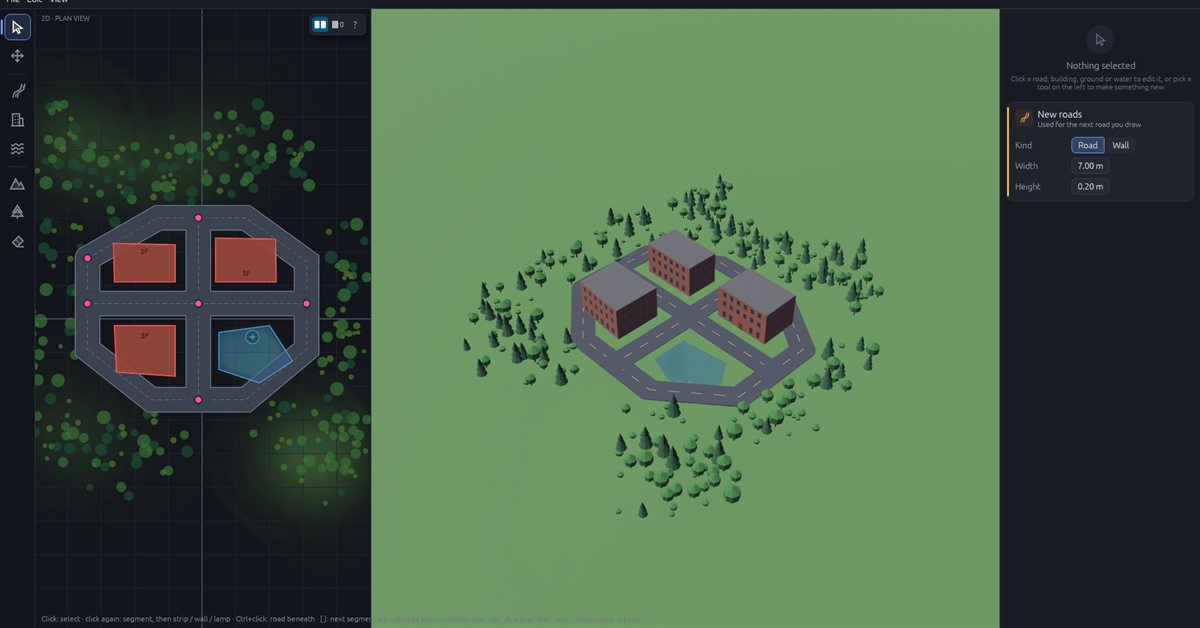
The short answer: to make a game map, first decide what the player will do. Then sketch the layout with simple shapes, shape the land, add buildings and trees, and walk around your map before you export it. Do these in that order and you will rarely have to start over.
This guide works with any game engine. The pictures come from Fiza3D, a map editor where you draw from above and watch the 3D world appear next to it.
The picture above is a small town made in the editor: hills, a ring road, three buildings, a lake and a forest. The bar at the bottom of the editor shows the 3D view updated in just 21 milliseconds.
The 7 steps
- Decide what the map is for
- Sketch the layout from above
- Shape the land
- Draw the roads
- Add buildings
- Add water and trees
- Walk around it, fix it, export it
1. Decide what the map is for
A race track, a survival island and a shooter arena all need different maps. Before you open any tool, answer three simple questions:
- What will the player mostly do? Drive, run, explore or fight?
- How much space do they need?
- What is the one place they should remember?
Also pick your size rule now. For example, one grid square equals one metre. Stick to it. Most "everything is the wrong size in my game" problems come from skipping this.
2. Sketch the layout from above
Start rough. Use plain boxes and strips, with no textures and no decoration. This is called a block-out (some people say greybox). It is the cheapest time to make mistakes. Moving a road takes a few seconds now. Moving it after you have added hundreds of trees takes an afternoon.
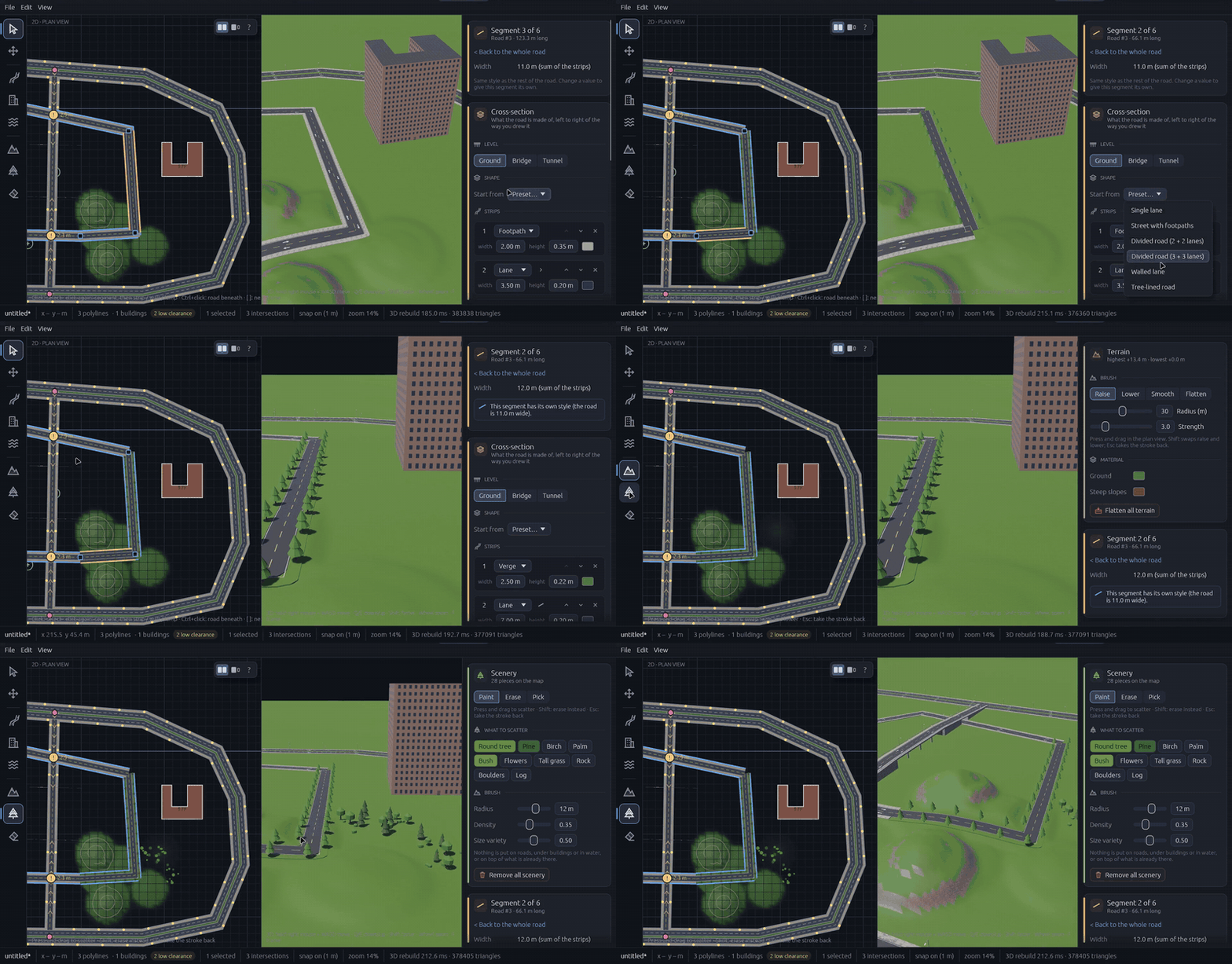
A view from above is the easiest way to do this, because you can see the whole map at once. In Fiza3D the grid snaps to 1 metre, and you can press G to turn that off. Each tool has one key: P for roads, B for buildings, W for water, T for terrain, S for trees and rocks, and E to erase. You can undo and redo every step, so try things freely.
3. Shape the land
Hills and valleys decide where roads can go, where water collects and where players get a nice view. So shape the land first, then put things on top of it. Think big and soft: a ridge on one side, a valley, a flat area for the town. Small details can come later.
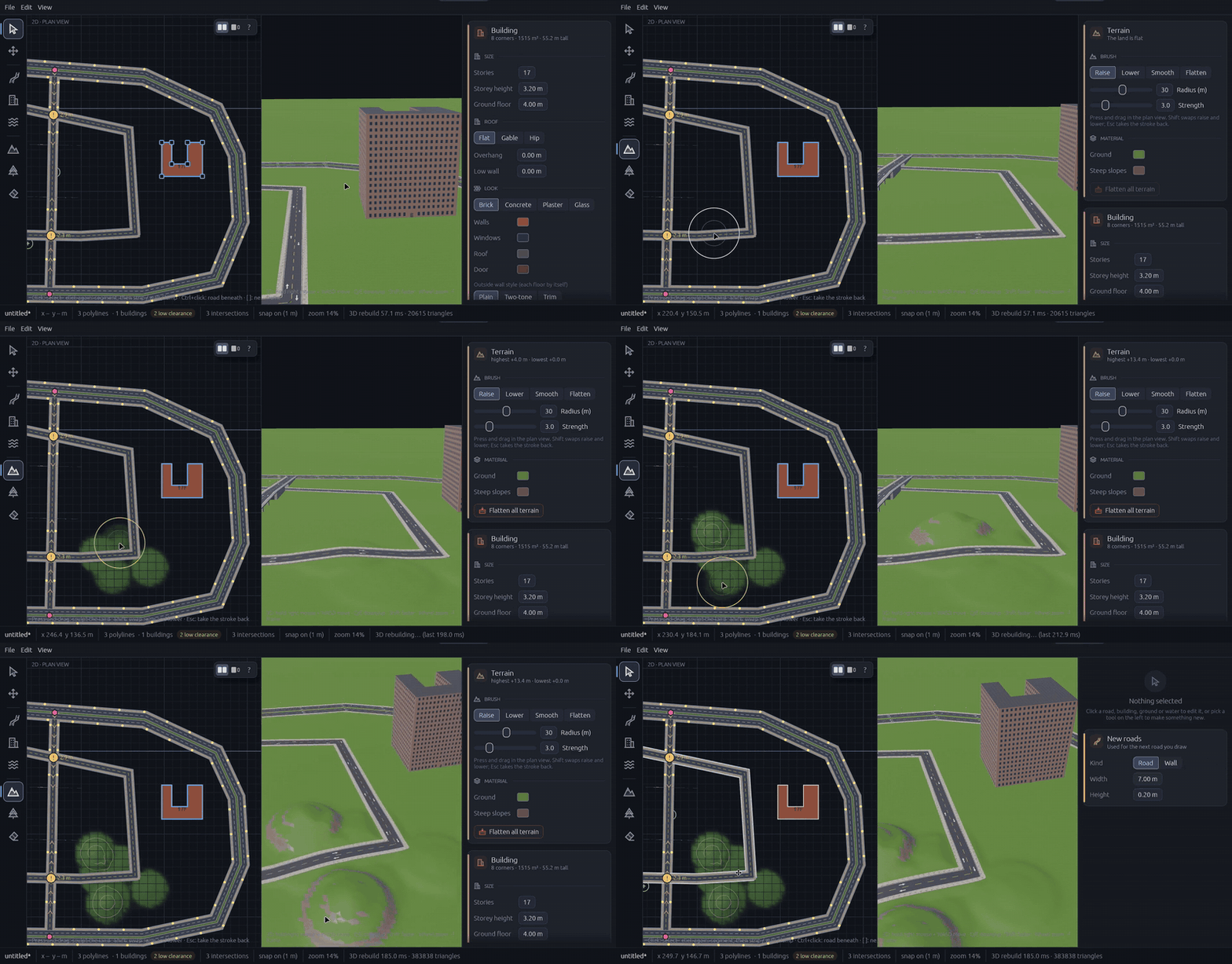
Why first? If you build roads on flat ground and add hills later, you usually have to fix every road by hand. Fiza3D smooths roads and building bases onto the land for you, but "land first, then everything on it" is still a good habit.
4. Draw the roads
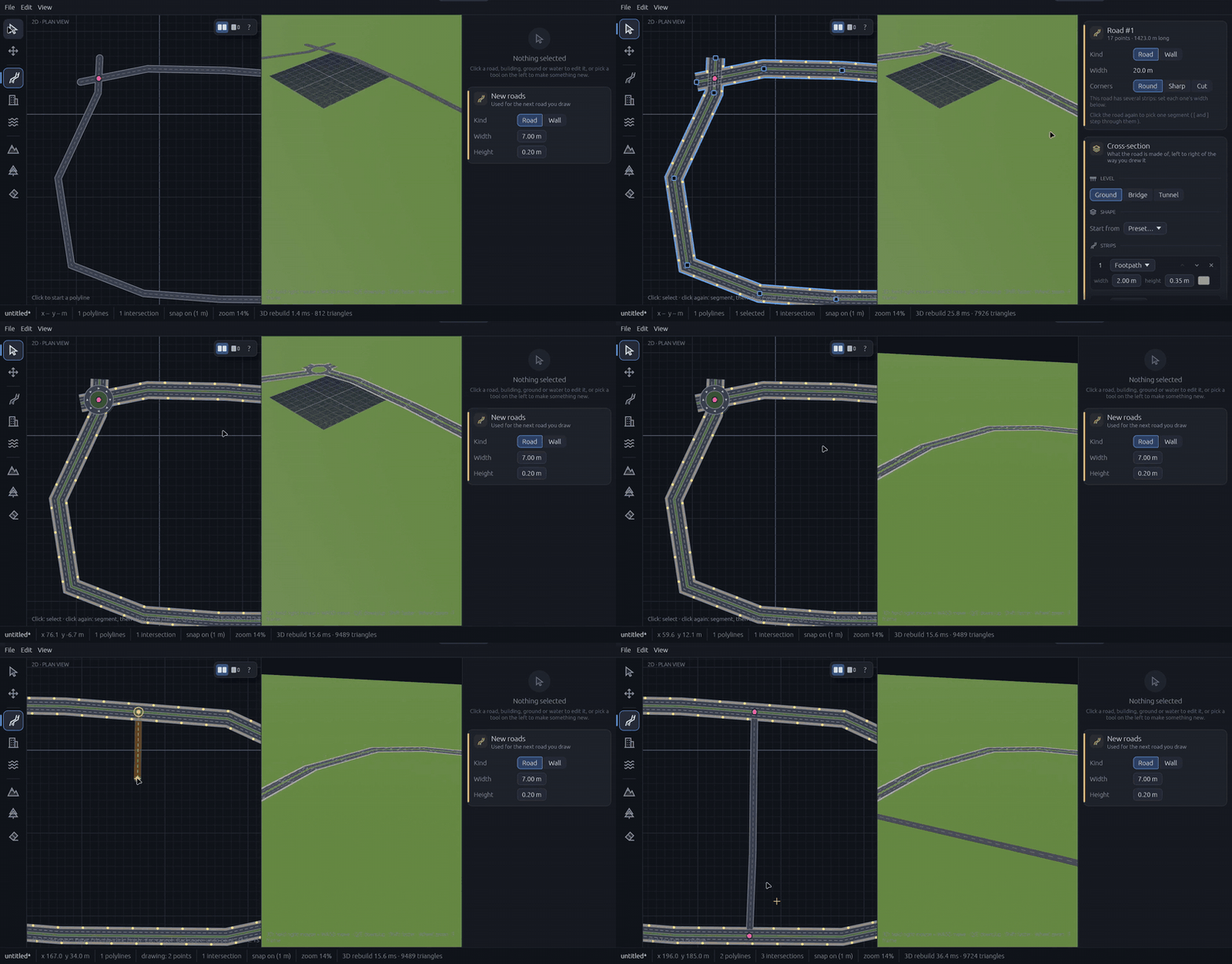
Roads are the backbone of most game maps, so give them the most thought. Here is an easy way to plan them:
- Draw two or three long main roads first.
- Add roads that connect them and make loops.
- Fill in small side streets last.
Loops are better than dead ends. They give players a choice at each turn, and they give computer-controlled cars a place to keep driving. The ring road in the picture at the top is a simple example.
In the editor, click to place road points, then press Enter or double-click to finish. Where two roads cross, the editor builds the junction for you, with lanes, kerbs and footpaths. You never join them by hand.
Want more detail? Read how to design a road network for a game level. If your map has hills or rivers, you will also like our guide to bridges, tunnels and flyovers.
5. Add buildings
Buildings give your map its character. Mix tall and short ones so the town has a skyline, and so players have a tall landmark to find their way by. Don't fill every block the same way. Leave one open square, make one block crowded and keep one corner quiet.
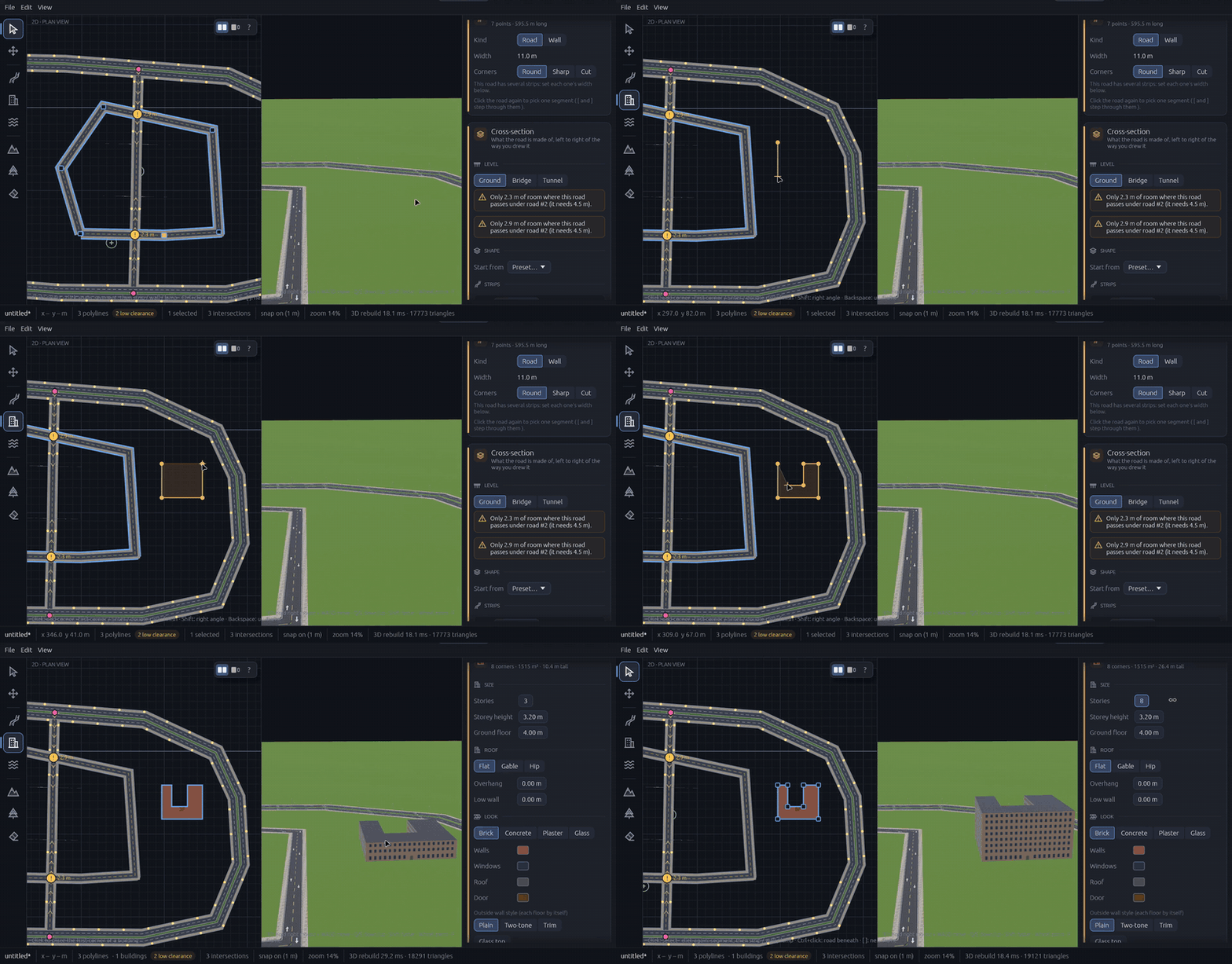
To add a building, click the corners of its outline. Click the first corner again to close it. Then choose how many floors it has, the roof style and the wall material. The outline does not have to be a rectangle. An L-shaped or U-shaped tower takes the same few clicks. If your game needs insides, you can open a building and edit it floor by floor, with rooms, doors, windows and stairs.
6. Add water and trees
Water and plants are what turn a rough layout into a real place. Add them last, because they depend on everything else. Trees should stay off the roads, and a lake needs land to sit in.
- Water: draw a lake or a river and the editor digs it into the land. Tick the bridge option and any road that crosses the water gets a bridge.
- Trees and rocks: paint them on with a brush. You choose the size of the brush, how thick the trees are and how much they vary. Keep trees thinner near roads so drivers can see ahead.
- Keep it natural: trees in neat rows look like an orchard. Groups with gaps in between look like a forest.
7. Walk around it, fix it, export it
A map can look perfect from above and feel wrong on the ground. Streets can feel too tight, views too long, doors too small. So always check your map at the player's eye level before you call it finished.
Fiza3D has a first-person walk-around in its own window (open the View menu, then Walk around). Use W A S D to move, Shift to run and Space to jump. Walls are solid and you can climb stairs, so it feels like playing.
When you are happy, press Ctrl+E to export. You get a glTF file (ending in .glb) with your land, roads, buildings and trees. glTF is a free, open format that Bevy, Godot, Unity, Unreal and Blender can all open, so you are not stuck with one engine. Our glTF export guide explains how to get a clean import.
Mistakes to avoid
- Adding details too early. Layout first, decoration last.
- No size rule. Decide on real-world units on day one.
- Too many dead ends. Loops feel better to play.
- Going too big. A small, busy, well-tested map beats a huge empty one.
- Only looking from above. Walk the map too.
Frequently asked questions
How long does it take to make a game map?
A small map, like one town or one race track, can take less than an hour if you draw it from above and let the tool build the 3D for you. Polishing it and setting up gameplay takes longer, and you do that in your game engine.
Do I need 3D modelling skills to make a game map?
No. Making a map is mostly about where things go and how far apart they are. In a map editor like Fiza3D you draw roads, buildings and hills from above, and the 3D world is built for you.
What file format should I use to move a map into my game?
Use glTF (the file ends in .glb). It is free, open and works with Bevy, Godot, Unity, Unreal and Blender. One file holds the shapes, materials and layout of your map.
What is a greybox or block-out?
It is a rough first version of a level made from plain shapes, with no final art. You use it to check size and flow before you spend time on details.
Fiza3D is opening soon. Join the waitlist to try this draw-from-above workflow, or watch short clips of how it works.
Build your first 3D map
Join the Fiza3D waitlist and be first in line when it opens up.
Join the waitlist